I am not entirely sure whether this scenario will ever be required in production. But just in case you come across this kind of setup.
Scenario:
You have a MVC Site that utilizes SQL Database deployed in LocalDB for storing data. This will happily work if you run your site from IISExpress. But as soon as you deploy the site to IIS, the application will throw errors if the database is still within LocalDB.
The argument is, why would one do that. I mean deploy MVC site in IIS and keep the SQL Database in LocalDB. To be honest, there is no real reason for doing so. But just for the sake of understanding the issue that may arise and how to overcome it, let’s assume that this is the case.
I have a MVC website MVCLocalDb deployed within IIS. This site stores ASP.NET membership within SQL Server Database “aspnet-MvcLocalDbApp-20170111113456.mdf”. This database is hosted in LocalDB.
Issue / Error
Assume that an identity “jane.doe@domain.com” already exists in the database. Now when you try to login using the credentials for Jane, you get a SQL Server error.

Looking within the Application Event Logs, you will see a bunch of errors;
Error #1: Unexpected error occurred while trying to access the LocalDB instance registry configuration. See the Windows Application event log for error details.
Error #2: Cannot get a local application data path. Most probably a user profile is not loaded. If LocalDB is executed under IIS, make sure that profile loading is enabled for the current user.
Error #3: Windows API call SHGetKnownFolderPath returned error code: 5. Windows system error message is: Access is denied. Reported at line: 422.
Solution
At this point I must confess the sites that I referred to apply specific resolutions.
https://blogs.msdn.microsoft.com/sqlexpress/2011/12/08/using-localdb-with-full-iis-part-1-user-profile/
https://blogs.msdn.microsoft.com/sqlexpress/2011/12/08/using-localdb-with-full-iis-part-2-instance-ownership/
There are multiple ways described in the 2 articles above to resolve the issue. I have taken the following approach;
Step #1: Modify applicationHost.config file to load the user profile for the application pool under which the website is running
Get the name of the application pool under which the website is running within IIS. In my example, the application pool name is “MvcLocalDbAppPool”.
Now open the applicationHost.Config file from “C:\Windows\System32\inetsrv\config” in Notepad. Make sure Notepad is running as administrator.
Find the Application Pool configuration entry for the website application pool (in this case MvcLocalDbAppPool).
You should find an entry as indicated below…
<system.applicationHost>
        <applicationPools>
            <add name="MvcLocalDbAppPool" />
            <!-- Other application pools also here -->
        </applicationPools>
Note: There will be a lot of entries within the <applicationPools></applicationPools> section. Just for simplicity, removed all the other items from the snippet.
Modify the key to include processModel along with loadUserProfile and setProfileEnvironment set to true.
<add name="MvcLocalDbAppPool" >
      <processModel loadUserProfile="true" setProfileEnvironment="true" />
</add>
Save the application host config file and then restart the application pool.
Step #2: Run application pool under a specific Windows user that has access on the LocalDb
Open IIS Manager.
Open Advanced Settings for the application pool (in our case MvcLocalDbAppPool).
Click on ellipses button the Identity property to open Application Pool Identity window.
On the Application Pool Identity window, change the option to Custom Account. Use an account that has access on LocalDb.
Click on OK to save the changes and then OK again to save and close Advanced Settings window.
Restart the application pool.
Did this resolve the issue?
After this, if you access the application, it should work. Certainly it did work for me.
There is one point to note though; If within your connection string the setting is to attach the mdf file, you may get the following error;

This is because, the publish process did not copy the database across to App_Data folder on the target location.
There are 2 ways to resolve this issue;
- Copy the database files after publishing to IIS.
- Modify the Web Config file to connect to the already attached database instance.
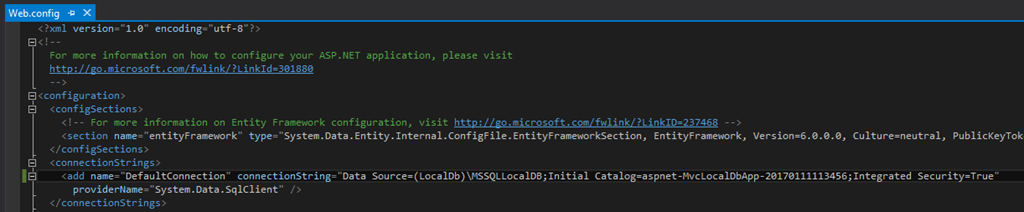
For the approach #2: Open the Web.config file. Locate the connection string settings.

Remove the configuration property from connection string that attaches the database. Leave the rest as is and save the file. Publish the website again.
Also within the LocalDb ensure that the database is attached (you can do this using SQL Server Management Studio).
Once this is done, it works just fine.


 Girish Zalke
Leave a comment